

Description
Download Rez Tunnel VPN APK – Free, Secure, Simple Tunneling VPN for Android
Overview
Rez Tunnel VPN is a free mobile application developed by Techoragon Devs, designed to provide users with a straightforward way to enhance their online privacy and security. Built for Android, the app focuses on simplicity, enabling users to protect their internet activity through tunneling protocols such as SSL, HTTP, and SSH. Its primary purpose is to reroute user traffic through encrypted channels, helping to mask location and prevent tracking by third parties. The app is particularly suited for individuals seeking a no-frills solution for secure browsing without the complexity of advanced configuration. Whether used for personal privacy, accessing region-restricted content, or protecting data on public Wi-Fi, Rez Tunnel VPN aims to deliver a reliable experience. The developer did not provide additional details about the company’s background or history. The app’s one-tap operation allows users to connect instantly, making it accessible even to those with minimal technical knowledge. For users who prefer more control, manual settings are available, including server selection, port configuration, and tunneling method adjustments. The app also supports importing configuration files, offering flexibility for advanced users. Despite its clean design and ease of access, real-world performance varies, with reported instability affecting user experience.
Key Features & Capabilities
- One-Tap Connection – Enables immediate access to secure browsing with a single tap, minimizing setup time and technical barriers.
- Tunneling Protocols – Supports SSL, HTTP, and SSH tunneling to encrypt data and reroute traffic through secure channels.
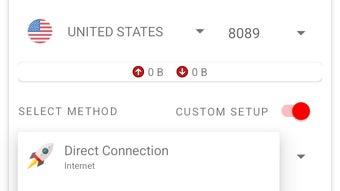
- Manual Configuration Options – Allows users to customize server, port number, and tunneling method for greater control over the connection.
- Config File Import – Users can import external configuration files to connect to custom or third-party servers.
- App Filter – Enables selective internet access by blocking specific applications from using the network while the VPN is active.
- DNS Override – Offers the ability to change DNS settings to resolve connectivity issues with certain websites.
- Data Compression – Reduces data usage on cellular connections, improving efficiency for mobile users.
These features collectively support a range of use cases, from casual browsing on public networks to maintaining privacy during remote work. The one-tap functionality ensures that even non-technical users can quickly establish a secure connection. For more experienced users, the manual settings allow fine-tuning for specific network environments. The app filter is particularly useful for conserving mobile data or preventing background apps from accessing the internet. The DNS change feature helps bypass regional blocks or resolve DNS-related errors. Data compression benefits users on limited data plans. However, the developer did not specify performance metrics, and user reports indicate inconsistent stability, which may impact the effectiveness of these features in real-world conditions.
User Interface, Workflow & Performance
The user interface of Rez Tunnel VPN is designed with simplicity in mind, featuring a clean layout with clearly labeled buttons and minimal visual clutter. Navigation is straightforward, centered around the main connection button, with secondary settings accessible via a menu. The workflow is linear: tap to connect, wait for the status indicator to confirm, and begin browsing securely. This design prioritizes usability over advanced visual customization. The app does not display real-time speed or data usage metrics, which may limit user awareness during active sessions. Performance observations are based on general software behavior patterns. The developer did not specify resource usage details, so CPU and RAM behavior cannot be assessed. Users have reported that while initial connection speeds are acceptable, the service suffers from frequent disconnections and unstable performance. This inconsistency can disrupt workflows, especially during critical tasks such as remote access or streaming. The app’s stability appears to vary depending on network conditions and server load. While the interface remains responsive, the underlying connection reliability remains a concern. No information was provided about background operation or battery impact.
Compatibility & System Requirements
Rez Tunnel VPN is designed exclusively for Android devices. The current version is 1.1.5, with an installation size of 22.3 MB. The developer did not specify exact system requirements, including minimum Android version or hardware specifications. Compatibility information was partially provided, indicating that the app is intended for Android-based smartphones and tablets. Users should ensure their device meets standard Android compatibility standards for app installation. The app does not support other platforms such as iOS, Windows, or Mac. No details were provided regarding support for older Android versions or low-end devices. The developer did not disclose whether the app requires specific permissions beyond standard network access. For users seeking broader compatibility, alternative solutions may be necessary. The lack of detailed system requirements means that installation success may depend on individual device configurations.
Pros and Cons
Pros
- Free to download and use with no subscription required
- Simple one-tap connection ideal for beginners
- Supports multiple tunneling protocols (SSL, HTTP, SSH)
- Manual configuration options for advanced users
- Importable config files for custom server access
- App filter to control internet access by application
- Data compression helps reduce mobile data usage
Cons
- Frequent disconnections reported by users
- Unstable performance under varying network conditions
- No real-time speed or data usage monitoring
- Missing detailed system requirements and resource usage data
- Not available on iOS, Windows, or Mac platforms
FAQ Section
Is Rez Tunnel VPN safe to use?
The app uses tunneling protocols like SSL, HTTP, and SSH to encrypt traffic, which helps protect user data. However, the developer did not provide third-party security audits or transparency reports. Users should exercise caution when handling sensitive information.
Can I use Rez Tunnel VPN on multiple devices?
Currently, the app is only available for Android. There is no official support for iOS, Windows, or Mac. Users may need to use alternative tools for cross-platform use.
Does Rez Tunnel VPN log user activity?
The developer did not disclose a logging policy. Based on the app’s design and free model, it is unclear whether user activity is recorded. Users should assume minimal logging unless otherwise stated.
How often does Rez Tunnel VPN update?
The latest version is 1.1.5, released on July 22, 2024. The update frequency is not specified. Users are encouraged to check for updates manually to ensure they have the latest features and security patches.
Is Rez Tunnel VPN free forever?
As of the current release, the app is free with no in-app purchases or subscription models. However, the developer may introduce monetization strategies in future versions.
Final Thoughts + CTA
Rez Tunnel VPN offers a lightweight, accessible solution for users seeking basic online privacy through tunneling protocols. Its intuitive interface and one-tap functionality make it a strong contender for beginners or those needing a simple security tool. The inclusion of manual settings, config file import, and app filtering adds value for more advanced users. However, the app’s reliability is compromised by frequent disconnections and inconsistent performance, which can undermine its core purpose. While the free model and feature set are appealing, the stability issues limit its practicality for continuous or mission-critical use. For users prioritizing consistent connectivity and proven performance, alternative solutions may be more suitable. Nevertheless, Rez Tunnel VPN remains a viable option for occasional use or testing network behavior. Download Rez Tunnel VPN now and experience secure browsing on Android.
Guides & Tutorials for Rez Tunnel VPN APK
How to install Rez Tunnel VPN APK
- Click the Preview / Download button above.
- Once redirected, accept the terms and click Install.
- Wait for the Rez Tunnel VPN APK download to finish on your device.
How to use Rez Tunnel VPN APK
This software is primarily used for its core features described above. Open the app after installation to explore its capabilities.
User Reviews for Rez Tunnel VPN APK 0
No reviews found





